Need a P.O. Box for your business registration? Applying for a government tender? Or maybe you just want a secure address for receiving important mail without sharing your home location? You’re in the right place.
Getting a post office box in Kenya used to mean long queues at the post office, confusing paperwork, and waiting days for approval. Not anymore. The entire process is now online, straightforward, and you can complete it from your phone or computer in less than 15 minutes.
Kenya offers two types of P.O. Boxes: traditional physical boxes at post offices and modern virtual boxes linked to your phone number. Each serves different needs, and we’ll walk you through both application processes, costs, requirements, and which one makes sense for you.
Types Of P.O. Box Options in Kenya
Before you apply, you need to know which type of P.O. Box fits your situation. The choice affects your costs, how you collect mail, and what you can use the address for.
Physical P.O. Box (Traditional)
This is the classic metal box you’ve seen at post offices. When you apply for this option, you get a physical key, a box number, and a designated slot at your chosen post office location in Kenya( Check this article to see all the Kenya Postal Codes).
Usually, the way it works is that the box you are given sits in the post office. When you have mail, it will get sorted into it, and then you can walk in anytime during working hours, unlock your box, and take your mail.
These Traditional Boxes are best suited for:
- Registering a limited company (Business Registration Service requires it)
- Government tenders and contracts
- Businesses expecting high mail volume
- Import/export operations
- Legal or professional practices
- Anyone wanting maximum security and privacy
Virtual P.O. Box (MPost – Posta Mkononi)
Unlike the Traditional Boxes, the Virtual Boxes are Posta Kenya’s digital solution that allows you to easily access your mails and parcels via a notification on your Phone. It was launched in partnership with mobile operators, and in this case, your phone number literally becomes your postal address, replacing the traditional physical boxes.
It is best suited for:
- Individuals needing a reliable postal address
- Sole proprietors and small businesses
- Students (HELB, university correspondence)
- Freelancers and remote workers
- Anyone on a budget
- People who move locations frequently
To help you understand the difference between the two, here is a quick comparison between the Physical vs Virtual P.O. Box:
| Feature | Physical P.O. Box | Virtual P.O. Box (MPost) |
|---|---|---|
| Setup Time | 1-3 days (key collection required) | 2 minutes (instant activation) |
| Registration Method | Online via posta.co.ke | USSD (*631#), Website, WhatsApp |
| Cost (Individual) | KES 2,610 first year (incl. key deposit) | KES 2,050/year (no deposit) |
| Cost (Corporate) | KES 10,060 first year | KES 9,450/year |
| Physical Key | Yes (2 keys provided) | No key needed |
| Address Format | P.O. Box 12345-00100, Nairobi | 254XXXXXXXXX-00100 |
| Mail Collection | Visit anytime during working hours | Can change the collection post office |
| Notification System | No alerts (check manually) | SMS + Email alerts |
| Location Flexibility | Fixed to one post office | Can change collection post office |
| Best For | Businesses, companies, high mail volume | Individuals, students, freelancers |
| Business Registration | Required for limited companies | Accepted for most registrations |
| Government Tenders | Fully accepted | May have restrictions |
| Security Level | Maximum (locked physical box) | High (ID verification required) |
| Key Deposit | KES 560 (refundable) | None |
| Renewal Process | Visit only when the SMS alert is received | Visit only when SMS alert is received |
What You Need Before Applying
Getting your documents ready before you start saves time and prevents application rejections. The requirements vary based on whether you’re applying as an individual or on behalf of an organization.
For Personal/Individual Application
You must have:
- Valid Kenyan National ID OR Passport (must not be expired)
- Active mobile phone number (for notifications and payments)
- Working email address (confirmation sent here)
- Physical residential address or location
Other Optional requirements, but recommended, are as follows:
- KRA PIN (if you plan to use the box for any business or tax-related correspondence)
- Alternative phone number (backup contact)
For Business/Corporate Application
The required documents are as follows
- Certificate of Incorporation or Business Registration Certificate
- KRA PIN Certificate for the business
- Valid Tax Compliance Certificate (from KRA iTax portal)
- Copies of the company directors’ National IDs
- Business physical address/location
- Company email address and mobile number
- Company seal or official stamp (for document authentication)
For Learning & Religious Institutions
- Schools, churches, mosques, and temples need:
- Institution registration certificate
- Head of the institution’s National ID
- Official institution letterhead
- Board resolution or authorization letter (for larger institutions)
For NGOs and Special Groups
- NGO registration documents from the NGO Board
- Tax exemption certificate (if applicable)
- Authorized signatory’s ID and appointment letter
- Organization’s official contacts
How Much Does a P.O. Box Cost in Kenya? (2026 Rates)
Opening a Personal Box in Kenya requires payment, and the cost varies depending on the type of box you open, which is charged annually. The charges range from as low as Ksh 2,050 for the individual boxes to as high as Ksh 9,500 for the Business boxes.
Here is a complete P.O. Box Fee Structure 2026:
| Box Type | Application Type | First Year Cost | Annual Renewal | Key Deposit | Total First Payment |
|---|---|---|---|---|---|
| Physical Box | Individual/Personal | KES 2,050 | KES 2,050 | KES 560 | KES 2,610 |
| Physical Box | Corporate/Business | KES 9,500 | KES 9,500 | KES 560 | KES 10,060 |
| Physical Box | Special Corporate/NGO | KES 6,275 | KES 6,275 | KES 560 | KES 6,835 |
| Physical Box | Learning & Religious Institutions | KES 7,775 | KES 7,775 | KES 560 | KES 8,335 |
| Virtual Box (MPost) | Individual/Personal | KES 2,050 | KES 2,050 | None | KES 2,050 |
| Virtual Box (MPost) | Corporate/Business | KES 9,450 | KES 9,450 | None | KES 9,450 |
How to Pay
All P.O. Box payments go through the eCitizen platform. The eCitizen portal allows you to use the following payment channels:
- M-Pesa (most popular)
- Debit/Credit card
- Bank direct payment
- Airtel Money
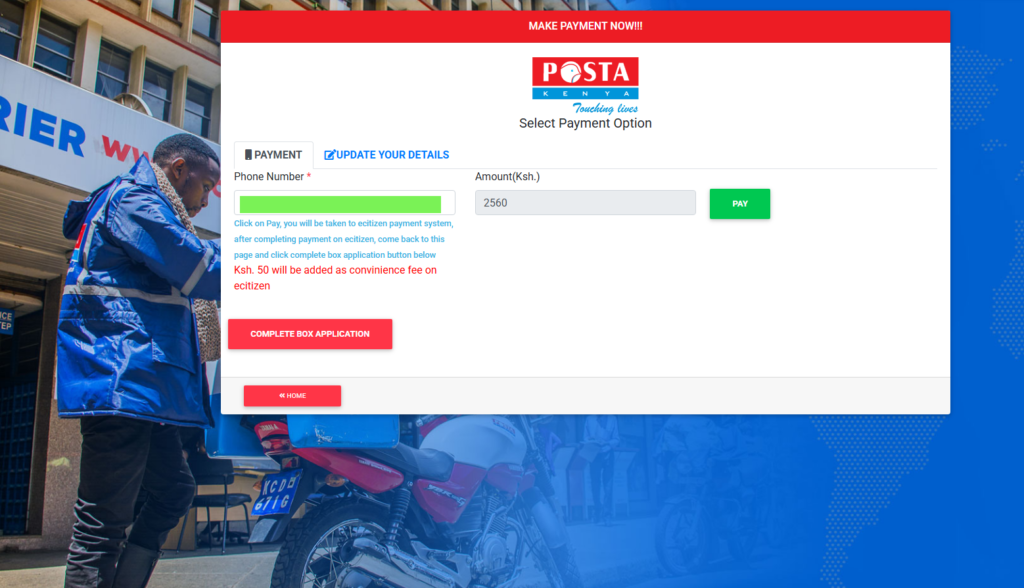
After you have made your payment the eCitizen system generates a payment reference number that’s valid for 24 hours. Pay within that window, or you’ll need to restart the application.
How to Apply for Physical P.O. Box Online
Now, how do you get to own a Physical Box in Kenya? Follow these exact steps, and you’ll have your P.O. Box application submitted in under 15 minutes.
NOTE: In these reference materials, we’re walking you through the individual application process here – business applications, for other box applications, the process is just the same, with additional document uploads.
Step 1: Access the Posta Kenya Online Portal
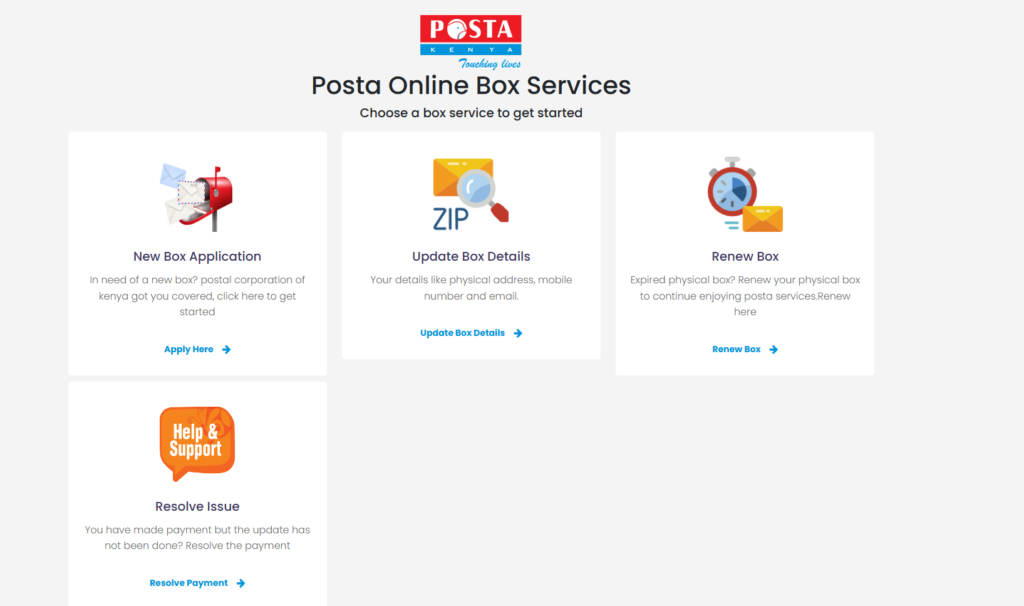
Open your browser and go to: posta.co.ke. Once the homepage loads, look for “Online Services” – it’s usually in the middle section with blue icons. Click on it, then select “Box Services”.
You’ll see three options:
- New Box Application
- Update Box Details
- Renew Box
Click “Apply Here” under “New Box Application”. A pop-up window opens to now start your application process.
Step 2: Choose Your Application Type
The first thing you see is a dropdown menu: “Choose Type of Application.”
Select from:
- Personal – For individuals
- Business – For registered companies
- Standalone – For businesses without complete registration
- SpecialGroup – For NGOs and special corporate entities
- LearningAndReligiousOrganizations – For schools, churches, etc.

Depending on your application type, choose the option that suits you best. But for the sake of this article, you’ll choose “Personal”. The form adapts based on your selection.
Step 3: Fill in Personal Details
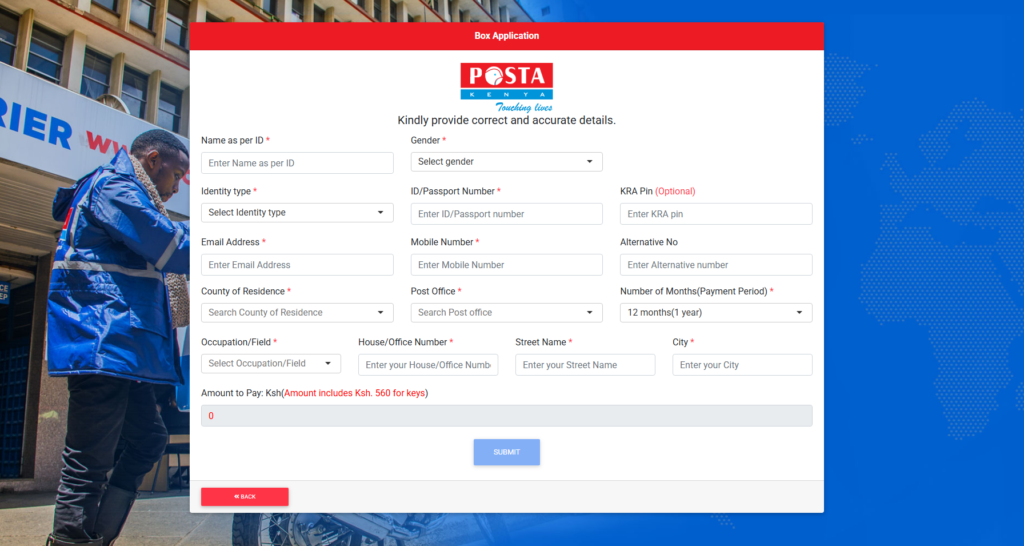
On this step, the form will now require you to provide your personal details. Fill in your official NUmbers exactly as they appear on your National ID. For passports, include all letters and numbers.
Other necessary details you are to fill include the following:
- Email Address
- Mobile Number
- Alternative Number
- County of Residence
The critical part when filling the form is choosing where your physical box will be, or for MPost users, where you’ll collect mail when notified. On this part, pick the post office near your home or workplace that you can easily access.
Step 4: Select Payment Period
Based on your annual payment period, which ranges from 12 months (1 year) to 36 months (3 Years), the system calculates your total cost automatically. If you are just getting started, choose 1 year to start, then renew annually. The Payments are the same as we mentioned above in the article.
Step 5: Complete Payment via eCitizen
In the final stages, the system will redirect you to the eCitizen payment gateway to complete your payment, where you can choose the payment method that suits you best, ie, M-Pesa, Airtel Money, debit/credit card, or bank to make payments.
Once the Payment is made Within 10 minutes, you receive a confirmation email from Posta Kenya with:
- Your P.O. Box number
- Post office location
- Instructions for key collection
- Payment receipt
Check your spam/junk folder if you don’t see the email.
Step 6: Collect Your Box Key (Physical Boxes Only)
Within 7 days of receiving your confirmation email, proceed to the Post Office where you made your application to collect your Box Key. When visiting, make sure to carry the following:
- Original National ID or Passport (the one you used in the application)
- Printed confirmation email from Posta Kenya
- eCitizen payment receipt (printed or on your phone)
At the post office you will be guided by the customer service desk..
How to Apply for Virtual P.O. Box (MPost) Online
Since the Postal Corporation of Kenya also offers digital solutions to the physical boxes, now dubbed as the Virtual MPost. Here is how you can apply for it easily:
- Dial 631# from your phone
- Select “Register for MPost”
- Enter your first name
- Enter your last name
- Enter your National ID number
- Choose your nearest post office from the list
- Enter referral code (optional – skip if you don’t have one)
- Confirm all details
- M-Pesa payment prompt appears on your screen
- Enter your M-Pesa PIN to pay KES 2,050
- Receive confirmation SMS with your virtual address
Frequently Asked Questions
Yes, for personal boxes. KRA PIN is optional for individuals. However, if you plan to use the box for business, tax, or official correspondence, get a KRA PIN first.
Yes. Foreigners can apply using their passport number instead of a Kenyan ID. All other requirements remain the same.
Go to posta.co.ke → Box Services → Renew Box. Enter your box number, select renewal period, pay via eCitizen. Renewal is instant – no need to collect anything.